|
|
|
|
|
|
|
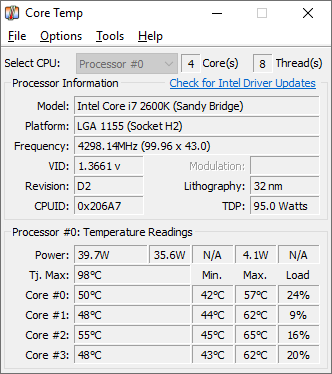
Core Temp is a compact, no fuss, small footprint, yet powerful program to monitor processor temperature and other vital information.
What makes Core Temp unique is the way it works. It is capable of displaying a temperature of each individual core of every processor in your system!
You can see temperature fluctuations in real time with varying workloads. Core Temp is also motherboard agnostic.
All major processor manufacturers have implemented a "DTS" (Digital Thermal Sensor) in their products. The DTS provides more accurate and higher resolution temperature readings than conventional onboard thermal sensors. (How does it work?).
This feature is supported by all recent x86 processors.
Processors by Intel, AMD and VIA are supported. A complete list of supported processors is available.
Core Temp is easy to use, while also enabling a high level of customization and expandability.
Core Temp provides a platform for plug-ins, which allows developers to add new features and extend its functionality. You can find our plug-ins and add-ons here.
If you are a developer and you are interested in creating your own addition, please see the developer's page.
|
|
|
Core Temp Requirements
Operating System: Microsoft Windows 11, 10, 8/8.1, 7, XP, 2025 Server, 2022 Server, 2019 Server, 2016 Server, 2012 Server, 2008 Server, 2003 Server.
Processor: Intel, AMD or VIA x86 based processor.
|
|
|
Core Temp goes mobile!
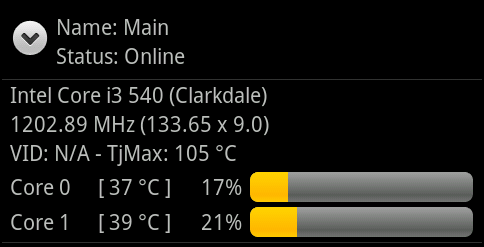
Have you ever wished that you could keep an eye on your systems while you were out of home or the office?
If you have an Android or Windows Phone device, now you can! Click here for more information.
|
|
|
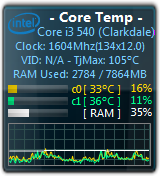
Core Temp Gadget and Windows Media Center addon for Windows 7 and Vista.
Recently I've released a new version of the Core Temp Gadget, completely overhauled.
The new version includes a graph view, listing processor load or temperature as well as memory utilization.
The readings are now color coded and they are user adjustable from the Options screen. Among these improvements the gadget
can be resized and the information text above the readings can be hidden if so desired.
You can download Core Temp Gadget and CoreTempMC from the Add Ons page.
CoreTempMC is a Windows Media Center add-on for Windows 7 and Vista. It allows you to view information from Core Temp right
from the Media Center interface using your remote. In addition it also displays the memory utilization.
|
|
|
Version 1.20 - 4th April, 2026
- Add new notification tray configuration. It now allows you to show/hide any of the sensors that are available. This change means that existing color configs will be reset.
- Add a battery status indicator for the notification area.
- Add updated Mini-Mode.
- Add zoom setting for the main UI (in Options --> Settings --> Display)
- Add show Processor model name in a tool-tip when the name is too long to fit in the model field.
- Fix incorrect readings or missing readings or incorrectly mapped CPUs/cores on some Intel platforms.
- Fix driver security vulnerability.
- Fix BSOD on machines with Kernel-mode Hardware-enforced Stack Protection enabled.
- Fix BCLK detection on some Intel gen 10 and 11 systems.
- Fix BCLK detection in some situations on AMD K8 chips.
- Fix core temperature detection on some AMD Matisse, Rembrandt and Strix APUs.
- Fix TjMax for some Zen1 CPUs
- Fix Min/Max/Avg fields not recording changes while the Core Temp window is minimized
- Fix platform detection of LGA 2066 Kaby Lake processors.
- Fix temperature reporting on AMD AM2 CPUs (G-revision)
- Fix some AMD K8 (G-revision) CPU not detected on startup message
- Fix model name detection for K8 through K14 generations
- Fix Core Temp randomly crashing (caused by 3rd party SW)
- Fix Core Temp crash on start on some AMD Ryzens with a single CCD.
- Fix Core Temp starting at the wrong window position in certain situations.
- Change G15 applet to support displaying more than 8 temperatures, use the 3rd button to scroll to the next set of temps. And fix spacing for a less twitchy UI.
- Change ini file to correctly save each setting under its section (this may lead to some settings being reset to defaults)
|
|
Full change
log
|
Supported CPU
list
|
|